Setting up your Amazon Smart Plug is a simple yet effective way to enhance your smart home setup. You’ll start by unboxing the device and downloading the Alexa app, which is essential for the next steps. Once you’ve plugged it in, connecting to your Wi-Fi is straightforward. But there’s more to maximizing its potential, including voice control and automation features that can truly transform your home. Let’s explore how to get started.
Key Takeaways
- Unbox the Amazon Smart Plug and ensure it’s plugged into a functioning wall outlet for proper setup.
- Download the Alexa app to manage your Smart Plug and create a smarter home environment.
- Connect the Smart Plug to Wi-Fi by verifying compatibility and entering your network password in the Alexa app.
- Use voice commands like “Alexa, discover devices” to control and manage connected devices easily.
- Troubleshoot common issues by checking power, Wi-Fi connection, app performance, and device compatibility as needed.
Unboxing Your Amazon Smart Plug
Unboxing your Amazon Smart Plug is an exciting first step toward a more connected home. As you lift the lid, you’ll find the sleek plug, designed to blend seamlessly into any outlet.
The unboxing experience showcases its compact size and easy-to-use interface. You’ll appreciate its key product features, like voice control compatibility and scheduling options.
Each plug comes with clear setup instructions, ensuring you’ll get started quickly. You’ll also find a warranty card, emphasizing Amazon’s commitment to quality.
Downloading the Alexa App
Now that you’ve unboxed your Amazon Smart Plug, it’s time to download the Alexa app, which serves as the hub for controlling your new device.
You can find the app in the App Store or Google Play. Once you’ve located it, tap to start the app installation.
After downloading, explore the app features, like voice control and device scheduling, to maximize your Smart Plug’s potential. Set up your account, and you’ll be ready to manage your devices effortlessly.
Explore the app’s features like voice control and scheduling to fully unleash your Smart Plug’s capabilities.
With the app, you’ll have everything you need at your fingertips to create a smarter home environment. Happy connecting!
Connecting the Smart Plug to Power
To connect your Amazon Smart Plug to power, start by plugging it directly into a wall outlet.
Make sure the outlet is working before moving on.
Once it’s securely in place, turn on the device to prepare it for setup.
Plug Into Outlet
Once you’ve gathered your Amazon Smart Plug and chosen an appropriate location, simply plug it into an available outlet.
Consider smart plug placement carefully; select a spot that’s convenient for the devices you plan to control. Confirm outlet accessibility so you can easily reach the plug for any adjustments or troubleshooting.
Keep in mind that it’s best to avoid overcrowding the outlet with multiple devices, which could affect performance.
Now that your smart plug is securely plugged in, you’re one step closer to enjoying the convenience of voice-controlled automation in your home.
Stay tuned for the next steps!
Power On Device
With your Amazon Smart Plug securely in the outlet, it’s time to power on the device.
First, verify the plug is connected to a compatible device, like a lamp or fan, for peak power management. Once your device is plugged in, simply switch it on. You should see a light indicator on the Smart Plug, confirming it’s receiving power.
If you experience any issues, double-check the device compatibility and the outlet. This setup allows you to control your device remotely, enhancing your smart home experience.
Now you’re ready to explore the full potential of your Amazon Smart Plug!
Adding the Smart Plug to Your Wi-Fi Network
Before you can start enjoying the convenience of your Amazon Smart Plug, you’ll need to connect it to your Wi-Fi network.
First, verify your Wi-Fi network is compatible with the smart plug, as it typically requires a 2.4 GHz connection.
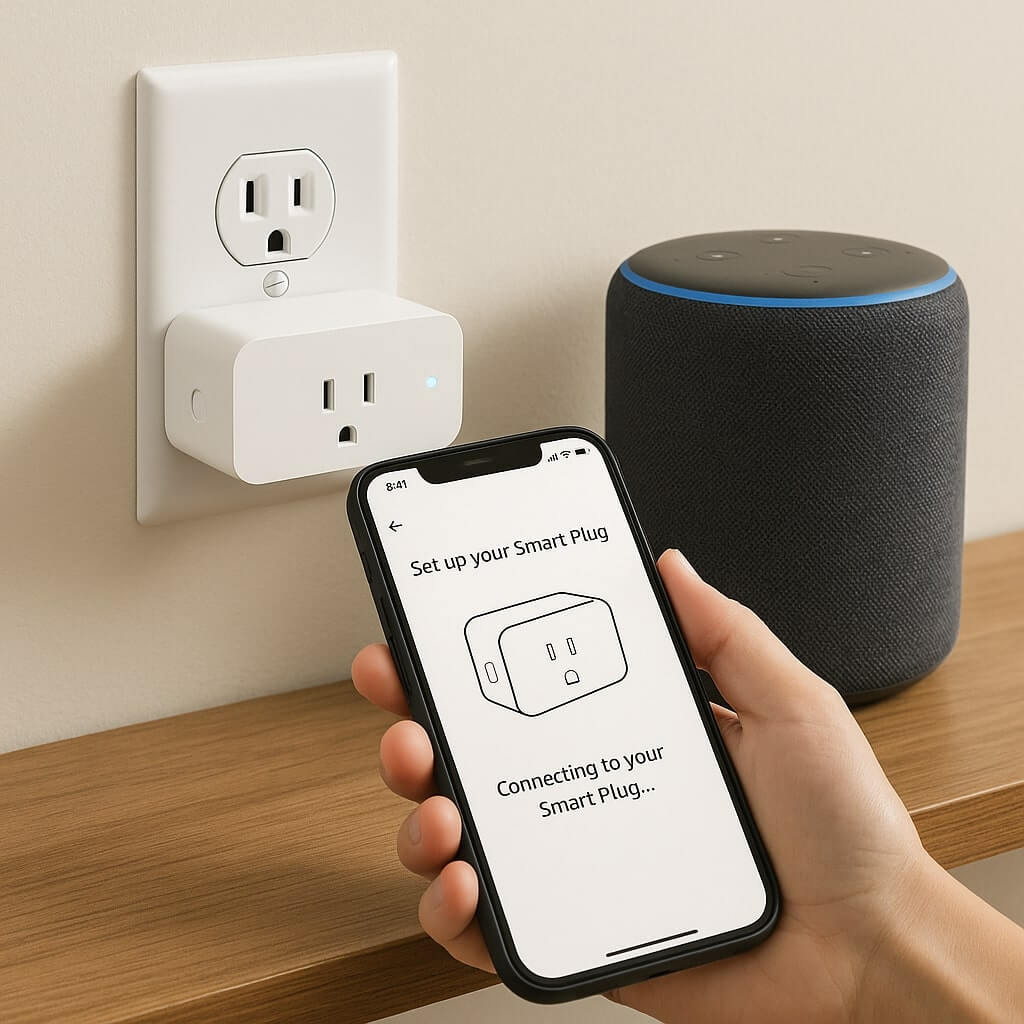
Next, open the Alexa app on your smartphone and tap “Devices.” Select “Add Device” and choose your Smart Plug.
Follow the prompts to enter your Wi-Fi password, keeping in mind network security—avoid using easily guessable passwords.
Once connected, your Smart Plug is ready for use, allowing you to control your devices effortlessly.
Enjoy seamless smart living!
Discovering Devices With Alexa
Now that your Amazon Smart Plug is connected, it’s time to discover how to use it with Alexa.
You’ll learn about the voice commands that make controlling your devices a breeze, the process of discovering those devices, and how to manage everything seamlessly.
Let’s explore these features to maximize your smart home experience!
Voice Commands Overview
When you set up your Amazon Smart Plug, discovering devices with Alexa makes the process seamless.
You’ll want to familiarize yourself with various voice command types to maximize functionality. Popular phrases like “Alexa, turn on the lamp” or “Alexa, turn off the coffee maker” are essential for controlling your devices effortlessly.
Additionally, you can use commands like “Alexa, set the plug to 50 percent” to adjust settings. By practicing these voice commands, you’ll enhance your smart home experience, making it easier to manage your devices with just your voice.
Embrace the convenience and start using Alexa today!
Device Discovery Process
To guarantee your Amazon Smart Plug is ready for use, you’ll need to initiate the device discovery process with Alexa. Start by saying, “Alexa, discover devices.” This prompts Alexa to perform a device compatibility check, scanning for your Smart Plug.
If it doesn’t find the device, don’t worry—connection troubleshooting is simple. Verify your Smart Plug is plugged in and connected to the same Wi-Fi network as your Alexa device. You may need to restart the Smart Plug or your router if issues persist.
Once discovered, you can enjoy seamless control of your Smart Plug through Alexa!
Managing Connected Devices
As you integrate your Amazon Smart Plug into your smart home setup, managing connected devices becomes essential for a seamless experience.
Use the Alexa app to easily oversee your devices and guarantee everything’s working smoothly. Regularly check for connectivity issues by re-running device discovery if something isn’t responding. You can rename devices for easier identification and group them for quick access.
If you’re facing challenges, try unplugging and reconnecting the Smart Plug, or resetting it to factory settings.
Effective device management will keep your smart home functioning at its best, making your life more convenient and enjoyable.
Naming Your Smart Plug
How can a well-chosen name for your Amazon Smart Plug enhance your smart home experience?
Smart plug names play an essential role in how you interact with your devices. When you opt for creative naming, you make it easier to remember and control them through voice commands or apps. Instead of generic labels like “Plug 1,” consider something descriptive, like “Living Room Lamp” or “Coffee Maker.”
This not only adds a personal touch but also helps streamline your routines. A thoughtful name can improve your overall efficiency and enjoyment of your smart home setup, making everything feel more connected and intuitive.
Setting Up Voice Control Commands
With your smart plug named effectively, you can now set up voice control commands to make managing your devices even more convenient.
Start by using simple phrases like “turn on” or “turn off” followed by your smart plug’s name. For more precision, customize your commands with unique names that reflect the device’s purpose.
Remember these voice activation tips: speak clearly and make sure your smart assistant can hear you well.
Experiment with different phrases to see what works best for you. With command customization, you’ll streamline your interactions, making your smart home experience effortless and enjoyable.
Scheduling and Automating Your Smart Plug
To enhance your smart home experience, scheduling and automating your Amazon Smart Plug can greatly simplify your daily routine.
Start by using the Alexa app to create scheduling routines. You can set specific times for the plug to turn on or off, like making your coffee machine start brewing in the morning.
For effective automation, consider integrating your Smart Plug with other smart devices. For example, link it to your smart lights so they all turn on together.
Remember these automation tips to streamline your home tasks, making your life more convenient and efficient with just a few taps on your smartphone.
Troubleshooting Common Issues
Sometimes, even the best technology can run into snags, and your Amazon Smart Plug is no exception. If you’re facing power issues, make sure it’s securely plugged in and that the outlet works.
Connection problems might arise; check your Wi-Fi strength and make sure your smart plug is within range.
If you encounter app glitches, try restarting the app or your phone.
Finally, confirm device compatibility; not all devices may work seamlessly with the smart plug.
Conclusion
You’ve successfully set up your Amazon Smart Plug and are now ready to enjoy a smarter home. With voice control, scheduling, and easy device management, you can enhance your daily routine effortlessly. If you encounter any issues, don’t hesitate to refer back to the troubleshooting tips. Embrace the convenience that smart technology brings and start exploring all the possibilities your new Smart Plug offers. Happy automating!